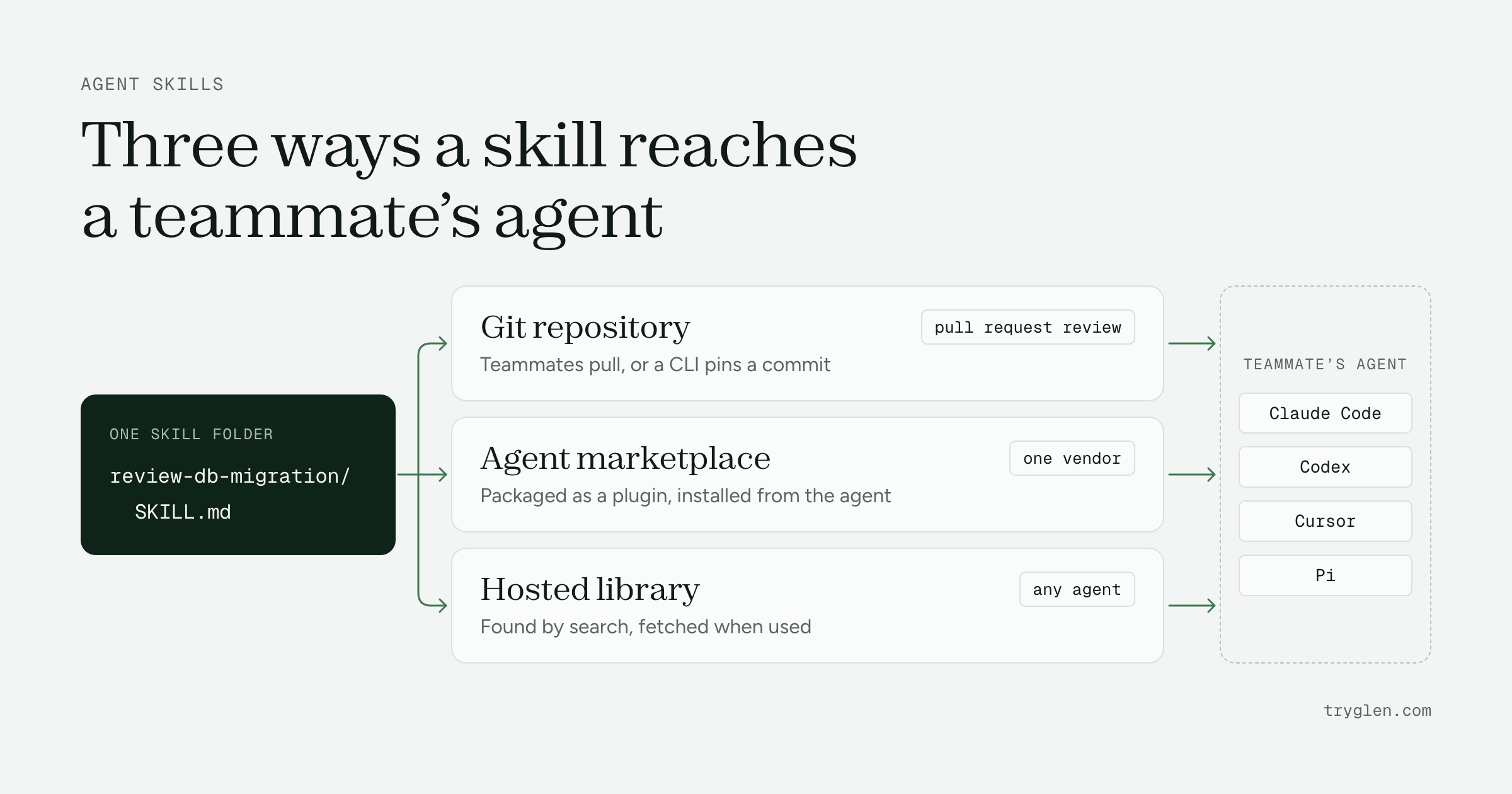
The Agent Skills format settled what a skill is: a folder with a SKILL.md file that Claude Code, Codex, Cursor and dozens of other agents can all read. It didn't settle how that folder reaches the rest of your team, who reviews a change to it, or how a teammate's copy stays current. Each agent answers those differently.
This guide compares the three ways teams share agent skills today: a versioned Git repository, an agent's own marketplace, and a hosted library. Every vendor detail below was checked against that vendor's documentation in November 2026.
Short answer
- One repository, one agent: commit skills to the repo (
.claude/skills/,.agents/skills/or.cursor/skills/). Teammates get them ongit pull, and changes go through pull-request review. - Many repositories: keep one canonical skills repository and install from it with a CLI such as vercel-labs/skills, which pins each skill to a commit in a lockfile.
- One agent across the company: package skills as a plugin and publish it through that agent's marketplace. Cursor and Claude Code both support this. It stops working the day a second agent arrives.
- Several agents, and nobody knows which skills exist: add a hosted library. Glen keeps skills in the same workspace as your team's session memory and serves them to any agent at run time.
These combine. A common setup is Git for review and history, plus one of the other two for distribution.
Skills, repository rules and session memory
Three kinds of team knowledge end up in an agent's context, and they load at different times. Putting each in the right place keeps instructions for one task out of the prompt for another.
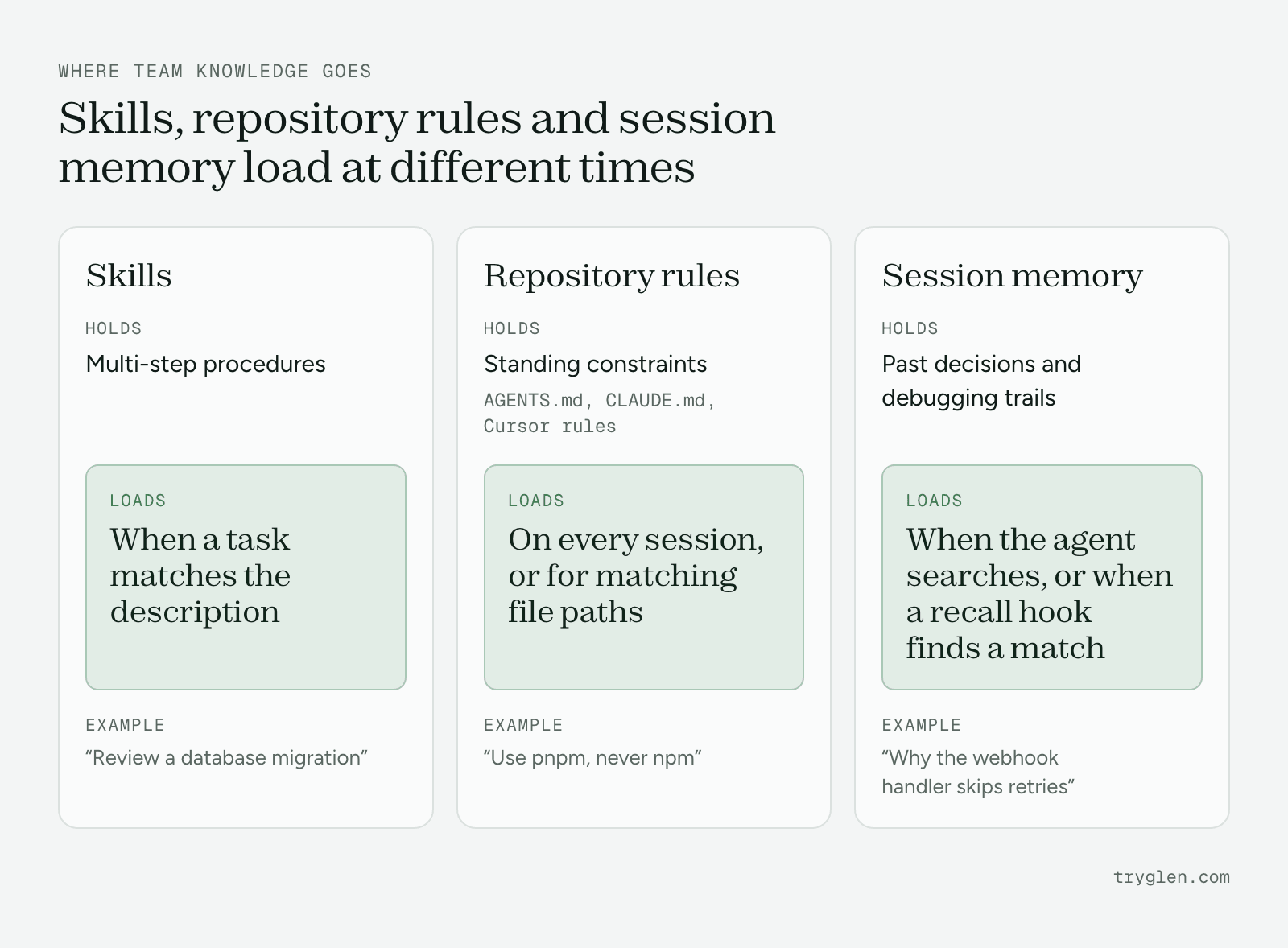
Skills hold multi-step procedures the agent runs only when a task calls for one: a database migration review, a release checklist, an incident write-up. The agent reads each skill's name and description at startup and loads the full instructions when a task matches.
Repository rules hold constraints that apply to every change, or to every change under a path: code style, the package manager, which directories are generated. They belong in AGENTS.md, CLAUDE.md or Cursor rules, because the agent shouldn't have to decide whether to fetch them. Cursor draws the same line: its /migrate-to-skills command converts dynamically applied rules and slash commands into skills, and leaves always-apply rules and file-glob rules alone.
Session memory holds what no checklist predicts: the debugging trail behind a fix, the reason a design was rejected, what was decided last time. An agent reaches it by searching, or through a hook that recalls matching context. Our guide to code search, AGENTS.md and session memory covers which source answers which question.
This post is about the first layer only.
What a portable SKILL.md covers
The Agent Skills specification defines the folder and nothing about distribution. A skill is a directory containing SKILL.md, with optional scripts/, references/ and assets/ directories beside it.
Two frontmatter fields are required. name is 1 to 64 characters of lowercase letters, digits and hyphens, and must match the directory name. description is up to 1,024 characters and is what the agent matches a task against. The optional fields are license, compatibility, metadata and allowed-tools, the last of which the specification marks experimental.
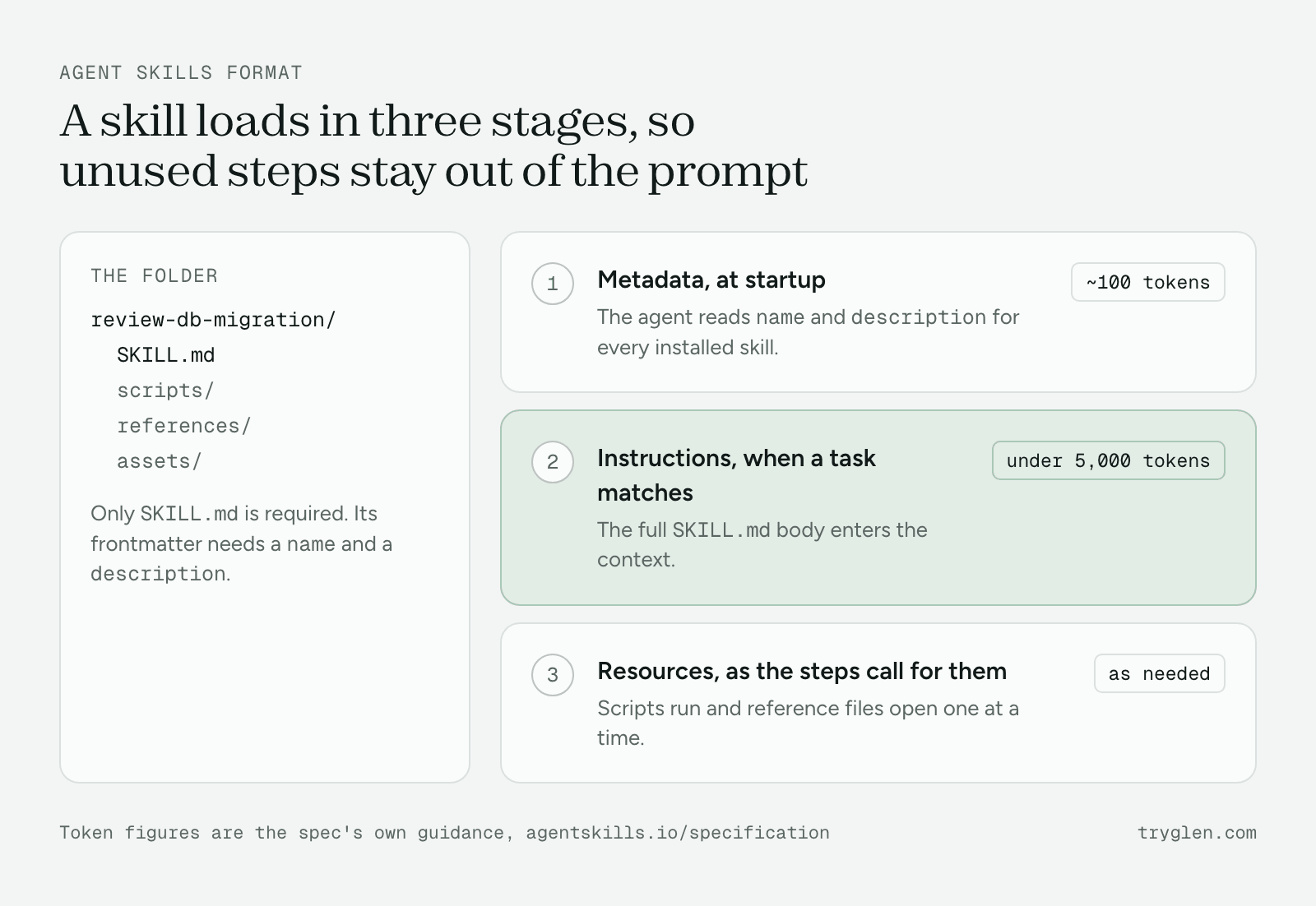
Loading happens in three stages, which the specification calls progressive disclosure. At startup the agent reads only name and description, about 100 tokens per skill. When a task matches, it loads the body of SKILL.md, which the specification recommends keeping under 5,000 tokens and 500 lines. Scripts and reference files are read only when a step needs them. Fifty installed skills cost a few thousand tokens until one is used.
What each agent decides for itself
Discovery paths, invocation and extra frontmatter are the agent's business, and they differ.
| Agent | Where it looks for skills | How a skill is invoked | Agent-specific extras |
|---|---|---|---|
| Claude Code | .claude/skills/ in the project, ~/.claude/skills/ for you | By description, or /skill-name | Plugins and managed settings for team rollout |
| Codex | .agents/skills/ in every directory from the working directory up to the repository root, ~/.agents/skills/, /etc/codex/skills | By description, or /skills and $skill-name | Optional agents/openai.yaml for display name, icon and whether implicit invocation is allowed |
| Cursor | .agents/skills/ and .cursor/skills/ in the project and in your home directory, plus .claude/skills/ and .codex/skills/ | By description, or /skill-name | paths and disable-model-invocation frontmatter; nested skill folders scoped to their subdirectory |
A skill written for one of these runs in the others as long as it sticks to the two required fields and sits in a folder that agent reads. .agents/skills/ is the closest thing to a shared path: Codex and Cursor both read it, and the Vercel CLI installs there.
One Cursor feature looks like team sharing and isn't. Turning on Sync Skills for Cloud Agents uploads your personal ~/.cursor/skills/ folder to your own cloud agents. Cursor's documentation says the synced skills stay private to you and aren't shared with your team. The sync also skips ~/.agents/skills/, project skills and remote SSH sessions, and automation runs don't load them.
Three ways to share agent skills
A versioned repository, with or without a CLI
Committing skills to the repository they serve gives you pull-request review and history for free. Teammates receive updates with the same git pull that brings in code. For a team on one repository and one agent, this is the whole answer.
It gets harder with several repositories. Git has no notion of a skill shared across repos, so teams fall back on submodules or copied folders, and copies drift. Nothing in a directory tree tells a teammate which skills exist or which agent each was tested with, so that ends up in a README someone has to maintain.
Vercel's skills CLI closes part of that gap. It installs skills from a Git source into .agents/skills/<name>, and its README lists support for OpenCode, Claude Code, Codex, Cursor and 75 more agents on Node.js 22.20 or later. The commands are add, find, list, use, check, update, remove and init.
The useful part for teams is the lockfile. Version 2 of skills-lock.json pins each Git source to a commit SHA and records a SHA-256 computedHash of the installed files. npx skills update moves the pin on purpose, so an upstream change never reaches a teammate unreviewed.
Restoring from the lockfile is still a preview feature. The documented command is npx skills experimental_install, with a warning that names, options and behaviour may change. skills install and its --frozen-lockfile flag work today as aliases for it, so treat both as preview in CI.
What Git and a CLI still leave to you: each teammate runs the update, and someone has to tell them a skill exists.
The agent's own marketplace
If every engineer uses the same agent, its native distribution is the least work.
In Cursor, a skill can't be imported on its own. It has to be packaged in a plugin whose repository contains .cursor-plugin/marketplace.json. You then import that repository under Customize, or add it as a team marketplace. According to Cursor's plugin documentation, team marketplaces are available on Teams and Enterprise plans, an admin can set a plugin to default off, default on or required, and installed plugins update on push when auto refresh is enabled. Admins can also turn off personal cloud-agent skill sync for every member.
Claude Code works the same way in outline. Its documentation says to distribute a skill "through a plugin or managed settings" to reach a whole team, and a plugin marketplace is a repository with .claude-plugin/marketplace.json. Codex distributes skills through plugins too, in the plugin directory it shares with ChatGPT.
The limit is in the name. A Cursor marketplace reaches Cursor. An engineer on Claude Code or Codex needs the same skill installed through a second channel, and now two copies need updating. Three agents means three.
A hosted library
A hosted library is a place to find skills that isn't tied to one agent or one repository. The products differ in how much they do beyond listing.
A catalog such as Skills Board keeps one entry per skill with its canonical source, owner, status and the agents it was tested on. It links to the source and doesn't copy or sync files, so installing and updating stay manual.
Glen stores the skill itself. This is how it works in the current release:
- Uploading:
glen skill create --dir ./review-db-migrationpacksSKILL.mdwith itsscripts/,references/andassets/folders, up to 100 files and 3 MB. MCP clients do the same with theglen_skill_createtool. - Sharing: a skill is private to its author until shared.
glen skill shareshares it with named teammates or with the whole organization. Only the author can edit or delete it. - Using:
glen skill use <slug>fetches the skill from the server and prints it into the agent's context. Bundled files are cached under~/.glen/skills/. Nothing is written to.claude/skills/or.agents/skills/, so there's no local copy to go stale. - Finding: in Claude Code, Codex and Pi, a hook checks each prompt against the skills you can see and, when one fits, the agent asks whether to use it. In Cursor and Grok Build the agent searches with
glen skill search. Claude and ChatGPT reach the same library through the remote MCP server. - Creating from work: when a session works out a process worth repeating, the agent offers to save it as a skill. It's saved privately unless you say otherwise.
Two things Glen's library doesn't do. It keeps no version history: an update overwrites the skill. And it has no review step before a shared skill changes. If you need either, keep the canonical copy in Git, review it there, and publish with glen skill create --update after the merge.
Sharing models compared
| Versioned repository | Agent marketplace | Hosted library | |
|---|---|---|---|
| Review before a change lands | Pull request | Whatever the plugin's repository uses | Depends on the product. None in Glen, so pair it with Git |
| Version history | Git log, and a commit pin with a lockfile | Git log of the plugin repository | Depends on the product. None in Glen |
| How a teammate gets it | git pull, or a CLI install | Installs from the agent, or an admin makes it required | Searches, or the agent offers it |
| How updates arrive | Teammate pulls or runs update | Auto refresh on push, where the agent supports it | Fetched at run time in Glen, manual in a catalog |
| Works across agents | Yes, if each agent reads the folder | No, one vendor | Yes |
| Who can see a skill | Anyone with repository access | Marketplace members | Per skill in Glen: author, named teammates or the organization |
Most teams with more than one repository and more than one agent end up with two of these. The repository is where a skill is written and reviewed. The marketplace or library is how a teammate finds and loads it.
Walkthrough: a database migration review as a shared skill
Say you paste the same SQL review checklist into your agent before approving every schema change. This is how it becomes a shared skill. It's an illustration of the workflow, with no measured results behind it.
Start with the folder. Keep SKILL.md to the two required fields and short steps, so every agent that follows the specification parses it the same way.
---
name: review-db-migration
description: Review SQL schema migrations for locking risks, backward compatibility, and rollback steps before merge.
---
### Scope
Run on pull requests that add or modify SQL migration files. Never execute production DDL or read secret files.

### Review checks
1. Flag destructive DDL, long table locks, and missing indexes on large tables.
2. Verify expand-and-contract compatibility with currently deployed application code.
3. Confirm an explicit rollback plan exists and return a pass or block summary.
Keep ownership details out of the frontmatter. A field one agent doesn't recognise is a parsing risk, and the specification's metadata map only takes string values. A references/maintainer.md file in the same folder does the job and travels with the skill:
| Field | Example entry |
|---|---|
| Owner | Database platform lead |
| Status | active, needs-review or retired |
| Canonical source | The one Git URL teammates install from |
| Tested agents | Only those verified on a sample migration diff |
| Update procedure | A pull request approved by the owner |
| Retire when | The tooling is replaced, or nobody has used it for two quarters |
The instruction "never execute production DDL" is a request, and the model can ignore it. A sentence in SKILL.md is not a permission boundary. If the skill ships a script in scripts/ that lints SQL or inspects a staging schema, review that script and the credentials it can reach the way you'd review any code that touches a database.
Team adoption checklist
- Pick one canonical source. Every shared skill lives in one versioned repository. Docs, catalogs and libraries point at it or are published from it.
- Test discovery in each agent you support. Confirm the agent lists the skill at startup and loads the full instructions on a representative task. A skill in a folder the agent doesn't read fails silently.
- Review bundled scripts as code. Anything in
scripts/, and any tool permission the skill asks for, gets the same review as production code. - Name an owner per skill. Changes go through that person's pull-request approval, triggered when the underlying tooling changes or the agent keeps misapplying the steps.
- Retire on a schedule. Twice a year, mark unused and superseded skills as retired, so nobody runs an old procedure beside the current one.
Where to start
Match the setup to how many repositories and agents you run.
Solo, or one team on one agent in one repository: commit skills beside your AGENTS.md and stop there. A hosted library adds nothing yet.
Several repositories, one agent: a canonical skills repository published as a plugin through that agent's marketplace.
Several repositories and several agents: a canonical repository for review, plus a CLI lockfile or a hosted library so a skill written once is found and loaded everywhere.
If your team's agents already share session memory through Glen, the skill library is in the same workspace and needs no extra setup. npx @tryglen/cli@latest install detects the coding agents on your machine and installs the plugin for each. The setup guides cover each agent, and the remote MCP reference lists the skill tools.
Frequently asked questions
Do skills written for Claude Code work in Codex and Cursor?
Yes, if they use only the name and description frontmatter and sit in a folder the other agent reads. Cursor reads .claude/skills/ directly. Codex reads .agents/skills/, so a Claude Code skill has to be copied or installed there.
Where should a team keep shared skills?
In one versioned Git repository, so every change has a reviewer and a history. Distribution can then go through a CLI lockfile, an agent marketplace or a hosted library, all reading from that repository.
Does Cursor's skill sync share skills with teammates?
No. Sync Skills for Cloud Agents copies your personal ~/.cursor/skills/ folder to your own cloud agents. Team sharing in Cursor goes through project skills in Git or a plugin in a team marketplace.
What is the difference between a skill and an AGENTS.md rule?
A rule applies to every session and is always loaded. A skill is loaded only when a task matches its description. Standing constraints belong in rules, and multi-step procedures used occasionally belong in skills. Context management strategies, compared covers the token cost of each.
Can a skill stop an agent from running a dangerous command?
No. Skill instructions are text the model is asked to follow. Enforcement comes from the agent's permission settings, sandboxing and the credentials available to it.